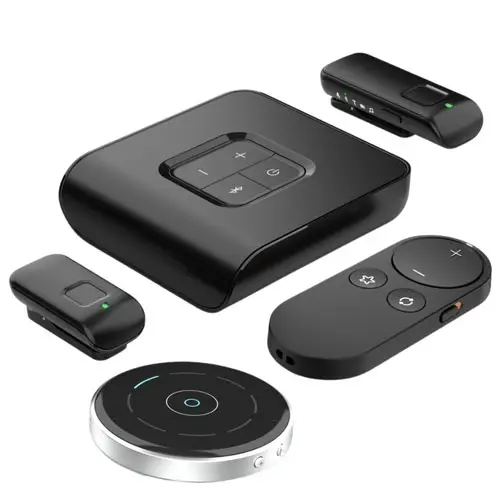
Starkey offers a strong lineup of wireless accessories, including TV streamers, remote microphones, table microphones, and remote controls. But there is one critical thing to know before purchasing any Starkey accessory: Starkey now has two generations of accessories that are completely incompatible with each other.
Buying the wrong generation is one of the most common and frustrating mistakes Starkey hearing aid owners make. This guide tells you exactly which accessories work with which hearing aids, why the split exists, and what the one exception is.
Why Starkey Has Two Generations of Accessories
The reason is a shift in wireless technology between hearing aid platforms:
- Older Starkey hearing aids (Genesis AI, Evolv AI, and earlier): use traditional Bluetooth, specifically the Made for iPhone (MFi) protocol. Accessories for these devices use the same MFi Bluetooth standard.
- Newer Starkey hearing aids (Edge AI and Omega AI): use Bluetooth LE Audio with Auracast, a fundamentally different and more advanced standard. Accessories for these devices use Auracast.
Because Auracast and MFi Bluetooth are not interchangeable at the audio streaming level, accessories designed for one will not work with the other. There is one exception covered later in this guide.
Newer Hearing Aids: Edge AI and Omega AI – Edge Accessories
The Naming Convention That Confuses Everyone
Any Starkey accessory with ‘Edge’ in the name is designed for Auracast-enabled hearing aids. Here is the important clarification that trips up almost every new buyer:
Despite the name, Edge accessories are compatible with BOTH Edge AI and Omega AI. ‘Edge’ in the accessory name does not mean Edge AI only. It means Auracast-compatible, which includes both Edge AI and Omega AI platforms.
Edge-Compatible Accessories (for Edge AI and Omega AI)
- StarLink Edge TV Streamer: streams TV audio directly to Edge AI or Omega AI hearing aids via Auracast
- StarLink Edge Remote Microphone: clips to a speaker and transmits their voice directly to your hearing aids
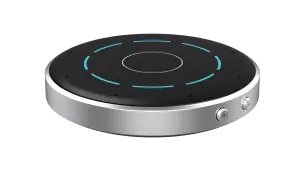
- StarLink Edge Table Microphone: sits on a table and picks up voices for group conversations
These accessories will NOT work with Genesis AI or Evolv AI hearing aids for audio streaming.
Older Hearing Aids: Genesis AI and Evolv AI – Legacy Accessories
Genesis AI and Evolv AI use traditional MFi Bluetooth, not Auracast. They require legacy Starkey accessories that do not have ‘Edge’ in the name.
Legacy Accessories (for Genesis AI and Evolv AI)
- StarLink TV Streamer (legacy version, no Edge in name): streams TV audio to Genesis AI or Evolv AI
- StarLink Mini Remote Microphone: a one-on-one microphone for closer conversations
- StarLink Remote Microphone Plus: versatile remote microphone for varied situations
- StarLink Table Microphone (legacy version, no Edge in name): group conversation microphone
These accessories will NOT work with Edge AI or Omega AI hearing aids.
The One Exception: Remote Control 2.0
The StarLink Remote Control 2.0 is compatible with all Starkey hearing aid platforms:
- Edge AI
- Omega AI
- Genesis AI
- Evolv AI
This works because the Remote Control 2.0 does not use Bluetooth audio streaming. It uses a simple wireless control signal to adjust volume and programs, allowing it to function across generations without the Auracast vs MFi distinction mattering.
Complete Accessory Compatibility Table
|
Accessory |
Omega AI |
Edge AI |
Genesis AI |
Evolv AI |
|
✅ |
✅ |
❌ |
❌ | |
|
✅ |
✅ |
❌ |
❌ | |
|
✅ |
✅ |
❌ |
❌ | |
|
❌ |
❌ |
✅ |
✅ | |
|
❌ |
❌ |
✅ |
✅ | |
|
❌ |
❌ |
✅ |
✅ | |
|
❌ |
❌ |
✅ |
✅ | |
|
✅ |
✅ |
✅ |
✅ |
How to Choose the Right Starkey Accessory
Before purchasing any Starkey accessory, confirm three things:
- Step 1: Identify which hearing aid platform you have. If you are not sure, check your My Starkey app or contact your provider with the serial number.
- Step 2: Determine whether your hearing aids use Auracast or MFi Bluetooth. Edge AI and Omega AI use Auracast. Genesis AI and Evolv AI use MFi.
- Step 3: If you have Edge AI or Omega AI, choose accessories with ‘Edge’ in the name. If you have Genesis AI or Evolv AI, choose legacy accessories without ‘Edge’ in the name. If you want a remote control, Remote Control 2.0 works for all.
When in doubt, compatibility matters more than appearance or price. Two accessories can look identical and have completely different Bluetooth technology inside. Contact our team before purchasing if you are unsure.
The Auracast Advantage of Edge Accessories
Because Edge accessories use Auracast, they offer a benefit that legacy accessories cannot: brand-agnostic streaming. A StarLink Edge TV Streamer can stream audio to any Auracast-enabled hearing aid, including hearing aids from other manufacturers like ReSound, Oticon, and Jabra.
We demonstrated this in our clinic: the StarLink Edge TV Streamer streamed TV audio simultaneously to Starkey Edge AI hearing aids and ReSound Nexia hearing aids at the same time. This cross-brand streaming was impossible with legacy accessories and represents one of the most practically significant benefits of Auracast.
Shop Starkey Accessories or Get Help Choosing
Browse our full selection of Starkey accessories, including Edge accessories for current platforms and legacy accessories for Genesis AI and Evolv AI. If you are not sure which generation you need, contact our team, and we will confirm compatibility from your serial number.
Frequently Asked Questions: Starkey Accessory Compatibility
Are Edge accessories only for Edge AI hearing aids?
No. Despite the name, Edge accessories are compatible with both Edge AI and Omega AI hearing aids. ‘Edge’ in the accessory name indicates Auracast compatibility, which both platforms support. Edge accessories will not work with Genesis AI or Evolv AI.
Why did Starkey release new accessories that are not compatible with older models?
Starkey’s newer platforms (Edge AI and Omega AI) use Bluetooth LE Audio with Auracast, which is a fundamentally different wireless standard from the MFi Bluetooth used by Genesis AI and Evolv AI. The two systems are not interchangeable for audio streaming, which is why a new generation of Auracast-based accessories was necessary. The shift enables features like brand-agnostic broadcasting that are not possible with MFi Bluetooth.
Will my older Genesis AI accessories work with my new Edge AI or Omega AI hearing aids?
No, not for audio streaming. Legacy StarLink accessories (TV Streamer, Remote Microphone, Table Microphone without ‘Edge’ in the name) use MFi Bluetooth and are not compatible with Edge AI or Omega AI for audio streaming. The one exception is the Remote Control 2.0, which works across all platforms because it uses a simple wireless control signal rather than Bluetooth audio.
Can I use Edge accessories with Genesis AI hearing aids?
No. Edge accessories use Auracast via Bluetooth LE Audio. Genesis AI uses MFi Bluetooth and does not support Auracast. The two systems are not compatible for audio streaming.
What is the StarLink Remote Control 2.0 and why does it work with everything?
The StarLink Remote Control 2.0 is a physical remote control for adjusting volume and programs on Starkey hearing aids. It works with all current Starkey platforms (Omega AI, Edge AI, Genesis AI, Evolv AI) because it does not use Bluetooth audio streaming. It uses a simple wireless control signal that is compatible regardless of whether the hearing aids use Auracast or MFi Bluetooth.
Can Starkey Edge accessories stream to hearing aids from other brands?
Yes, if the other hearing aids are Auracast-enabled. Auracast is an open standard, meaning any compatible device can receive from any Auracast transmitter. We tested the StarLink Edge TV Streamer in our clinic and successfully streamed audio simultaneously to Starkey Edge AI and ReSound Nexia hearing aids from the same transmitter. This cross-brand streaming is one of Auracast’s most significant practical advantages.
How do I know which hearing aid platform I have?
Check the My Starkey app, your hearing aid model will be listed there. If you have Edge Mode accessible by a double-tap on your hearing aid, you have an Edge-level product (Edge AI or Omega AI). If you are still unsure, contact our team with your serial number and we will confirm.